
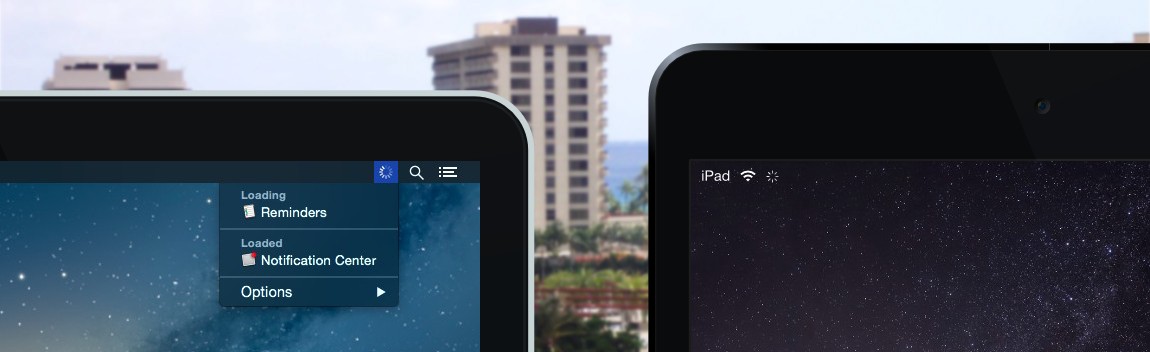
Loading
Network activity monitor
Loading is a lightweight network activity monitor that resides in the macOS menu bar. It provides a visual indicator when any application is using the network, mirroring the behavior users see on iPad and iPhone. The interface separates processes into two groups: those currently transmitting data and those that have used the network recently, allowing quick identification of active traffic.
Clicking the menu‑bar icon expands a list of the responsible apps, and holding the Option key reveals additional details such as process identifiers and file paths. Users can also disable the spinning animation for individual processes via a checkbox, reducing visual clutter. The app is purpose‑built for macOS and does not run on iOS, Android, Windows, or Linux.
Designed as a simple alternative to the Network section of Activity Monitor, Loading offers a more immediate and streamlined view of network usage without extensive configuration. It is stable, core‑macOS software aimed at users who want a quick, unobtrusive way to monitor per‑application network activity.
Reviews
Loading reviews…
Similar apps
Network & Connectivity
itraffic
Monitor for displaying process traffic on status bar
Network & Connectivity
PingMenu
Utility that shows the current network latency in the menu bar
Network & Connectivity
Private Eye
Network monitor

Network & Connectivity
PeakHour
Network bandwidth and network quality visualiser
Network & Connectivity
TripMode
Control your data usage on slow or expensive networks
System Monitoring & Maintenance
StatusStats
Mac Metrics In Your Menu Bar